Inklaim Features Figure numbering
Automatic numbering
When you move, insert or delete a figure, Inklaim recalculates the FIG. numbers from the order of the sheets and updates the “FIG. n” references in the description and claims. Before saving, you see every change and choose which ones to apply. With “Renumber all” you also reassign the reference numerals, following your firm's scheme.
Inklaim is web software from an Italian start-up founded in Turin that prepares draft patent drawings, checked against EPO, UIBM, USPTO, PCT, CNIPA and KIPO rules, from 3D CAD models (STEP/IGES), DXF or vector PDF files, photos of an object, sketches and claims.

The rules
Patent figures are numbered with consecutive Arabic numerals, independently of the numbering of the sheets. For the EPO, partial figures take the same number with a capital letter (FIG 7A, FIG 7B) and a single figure is not numbered; PCT and USPTO number the drawing sheets in the form “1/3”.
Inklaim applies these rules when it recalculates the numbers and when you export for the chosen office.
| Office | Figures | Drawing sheets | Source |
|---|---|---|---|
| EPO | “FIG” and consecutive Arabic numerals; partial figures with a capital letter; a single figure is not numbered. | Consecutive Arabic numerals, centered at the top; the “1/3” format is not prescribed. | Guidelines A-IX, 5.2, A-IX, 4.2; OJ EPO 2025, A49 |
| PCT | Consecutive Arabic numerals, independent of the sheets. | “1/3, 2/3, 3/3”: sheet number and total number of drawing sheets. | Rules 11.7 and 11.13 PCT; Administrative Instructions, Section 207 |
| USPTO | “FIG.” and Arabic numerals; a single view is not numbered. | “1/3” centered at the top, larger than the reference numerals. | 37 CFR 1.84(t) and (u) |
| UIBM | Numbered consecutively and referred to in the description. | Sheets numbered consecutively. | Art. 22(3), D.M. 33/2010 |
Updated October 2026
Reordering and references
Each figure's number comes from the order of the sheets. Views on the same sheet take letters, FIG. 1A and 1B, and a sheet can continue the previous one. The sheet number, for example “1/5”, updates with the others.
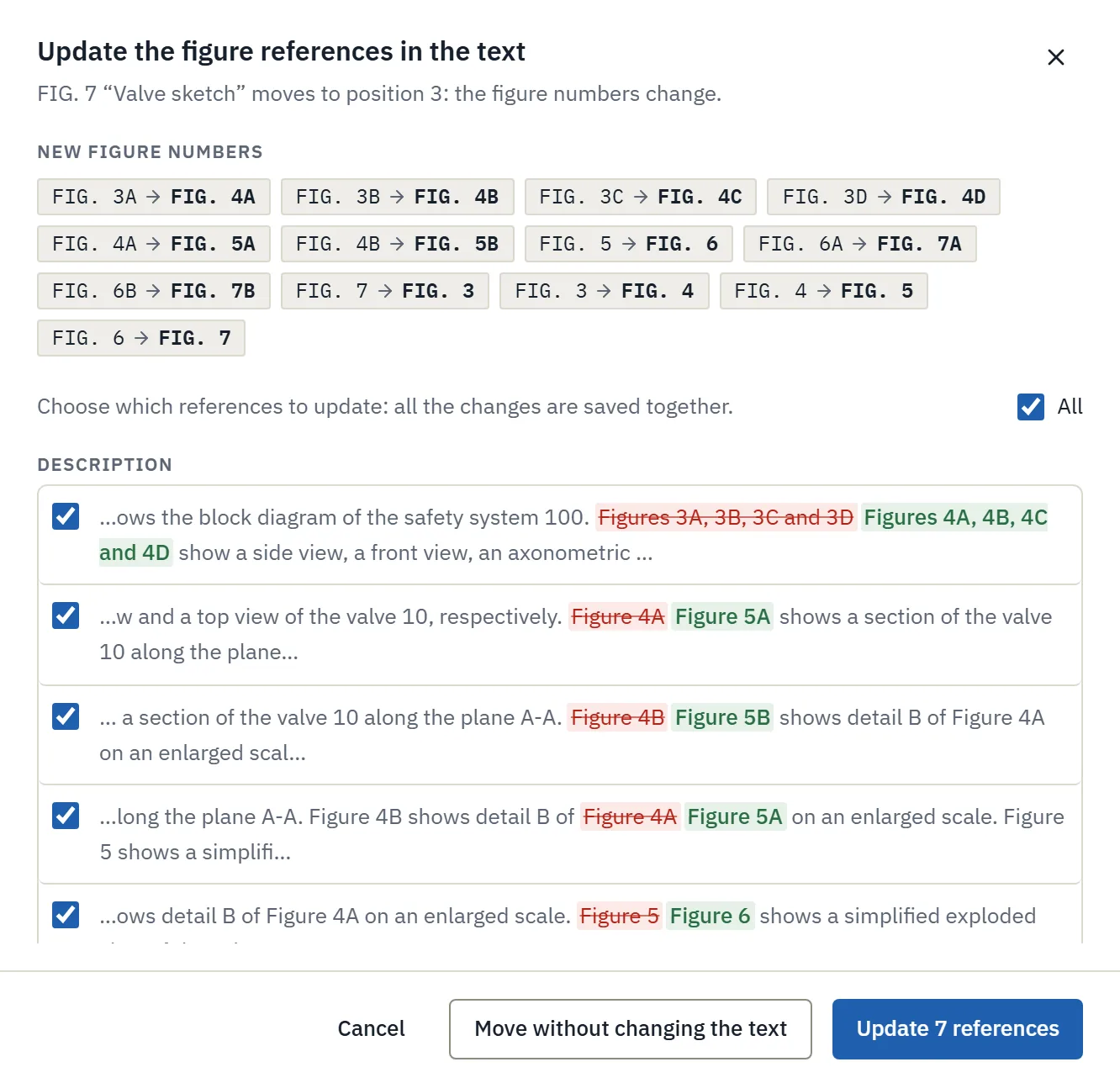
In the sample matter, FIG. 7 “Valve sketch” moves to position 3: thirteen figures change number and Inklaim proposes 7 references to update in the description, from “Figures 3A, 3B, 3C and 3D” to “Figures 4A, 4B, 4C and 4D”. If a cited FIG. is left without a figure, the consistency check flags it.
Renumber all
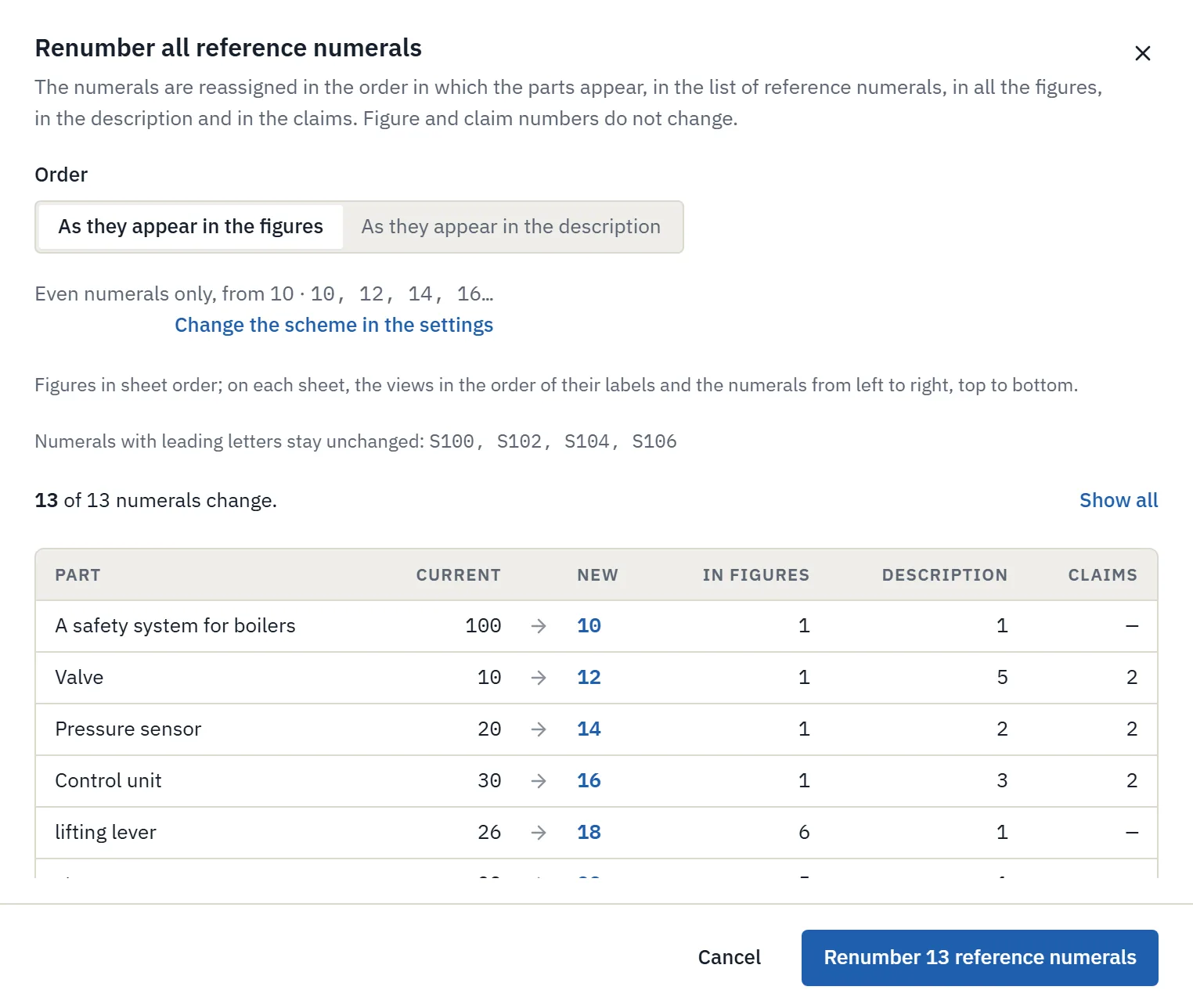
“Renumber all” reassigns the reference numerals of the parts in the order in which they appear: in the figures, or in the description. The list of reference numerals, the figures, the description and the claims change together.

Your firm's scheme
You set the numbering scheme once in the firm settings, and it applies to every renumbering.
The sequence starts at 10 and goes up in steps of two, so there is room to insert a part without renumbering.
Each figure has its own hundred: the parts of FIG. 1 from 100, those of FIG. 2 from 200.
For figures from a sketch or photo, the AI, if turned on, proposes the reference numerals. You confirm them before they are used.
The video
The video shows the five jobs draftspersons asked us to lighten. Automatic numbering is the fourth.
This is Inklaim, the drawing office for European patent firms. It prepares the sheets for filing from what the firm already has: the client’s 3D model, the technical drawing, the claims.
Today, figures are the most hand-crafted part of a matter: hours spent redrawing views that already exist, office rules, similar but not identical, and one wrong numeral is enough for an objection.
Draftspersons told us the five jobs they most want to lighten. Let’s see them in the app.
One: simplifying the figures. From the client’s 3D model, you choose the level of detail. With “Essential”, small holes, chamfers and fillets disappear, and so do threads. And screws and washers are removed on their own. Here is the same view: full on the left, essential on the right.
The same goes for the workshop drawing, as DXF or vector PDF. Dimensions, lettering, title block, centre lines and hatching disappear by themselves. Before confirming, you see in colour what will be removed, and how each view will look.
And what if the client’s drawing is full of identical objects, like these three hundred holes? Pick one, and “Select identical” finds every copy, even turned or mirrored. Check the selection, and delete them in one go. With AI, when it is on, just type it: “all the brackets along the rail”.
Two: sheets from the 3D model. Upload the STEP file and choose the views, axonometric and exploded views included. For the section, choose the plane on a preview: the section line A-A appears by itself. And several views on one sheet, at the same scale; the exploded view gets its own sheet.
Here is a sheet generated this way. Already laid out, with four views at the same scale. The parts carry the numerals already used in the text of the application. And the sheet stays editable, in AutoCAD too.
And what if the client only has the object? Two or three photos will do. Inklaim lifts the object off the background and suggests the lines: one click keeps the real ones. With AI, when it is on, it tells real edges from reflections itself and names the parts. One drawing per photo, with the same numerals. And for turned parts, the photos give a 3D model, with the match measured on every photo.
Three: consistency between the views. The Checks tab compares every figure in the matter, and the text. It finds the same numeral used for different parts, or the same part with different numerals. It flags figures that are cited but do not exist, or are out of order. It compares sizes across the views: here, one is ten per cent narrower. And from each warning, you go straight to what needs fixing.
Four: automatic numbering. Move one figure, and all the others are renumbered. Before saving, Inklaim shows every reference in the text that will change. And you choose which ones to update. If you cancel, everything stays as it was.
“Renumber all” reassigns the numerals in the order in which the parts appear, following the firm’s own scheme too, for example even numerals only. Figures, description and claims change together, and it can all be undone straight away.
Five: the texts in the drawings. All the wording in the figures is in a single table, with the translations alongside. Words are found and replaced across all the figures at once, and before confirming, you see every change, figure by figure. When AI is switched on, it translates them following the glossary and the claims.
And from the method claims, the flowchart is ready in a few seconds. With the steps already numbered, S100, S102, and so on. Without AI, straight from the text; then you edit it like any other drawing.
When the sheet is ready, you export it for filing. Choose the office, and sheet size, margins and labels follow its rules. China and Korea too, with the images for online filing. Then the language of the texts: there is only one drawing, and the numerals never change.
Matters, files and backups are stored in the European Union, and AI works in Europe. AI is optional, and whenever it is used, it is always disclosed. And no line is invented: each comes from the model, the drawing, the sketch or the photos.
We are proposing a four-week trial, with a group of three to six draftspersons and patent attorneys, on matters already filed and published, redone with Inklaim. Together, we measure the time saved and the quality of the sheets.
Let’s try it on real patents. If you are interested, let’s choose the three matters together and get started.
Before and after
After renumbering, it verifies that each numeral designates the same part in all figures.
Patent drawing consistency check →The EPO, PCT and UIBM rules on reference numerals, with the official sources.
Guide to reference signs →Sheets from 3D CAD, DXF and PDF import, flowcharts from claims, texts and translations.
Inklaim features →FAQ
With the same number followed by a capital letter, for example FIG 7A and FIG 7B (EPO Guidelines A-IX, 5.2). In Inklaim, views on the same sheet get their letters automatically: FIG. 1A, 1B.
No. Inklaim shows every “FIG. n” reference in the description and claims that changes. You choose which ones to update and save everything together; if you cancel, everything stays as it was.
No. It reassigns the reference numerals of the parts. Figure and claim numbers do not change, and numerals with leading letters such as S100 stay unchanged.
Yes. You set it in the firm settings, for example even numbers only from 10, or hundreds per figure (100, 200…), and it applies to every renumbering.
Yes, the sheet number “1/5” updates with the order of the sheets. On export you choose the office, and sheets and labels follow its rules.
Not for the EPO and the USPTO: a single figure carries no number (Guidelines A-IX, 5.2; 37 CFR 1.84(u)). On export you can remove the label with the “Include the figure label” option.
The pilot
In the 4-week pilot, 3 to 6 people from your firm use Inklaim to redo the sheets of 3 matters already filed and published. Then we compare time and quality together. It starts after a non-disclosure agreement is signed.