Inklaim Features Consistency check

Consistency check

Reference numeral check for patent drawings: one numeral, one part, across the whole matter

The Inklaim consistency check reads every figure of the matter together with the description and claims. It flags the same reference numeral used for different parts, the same part with two numerals, numerals that appear only in the text or only in the drawings, cited FIGs. that do not exist, and views drawn at a different scale.

Inklaim is web software from an Italian start-up founded in Turin that prepares draft patent drawings, checked against EPO, UIBM, USPTO, PCT, CNIPA and KIPO rules, from 3D CAD models (STEP/IGES), DXF or vector PDF files, photos of an object, sketches and claims.
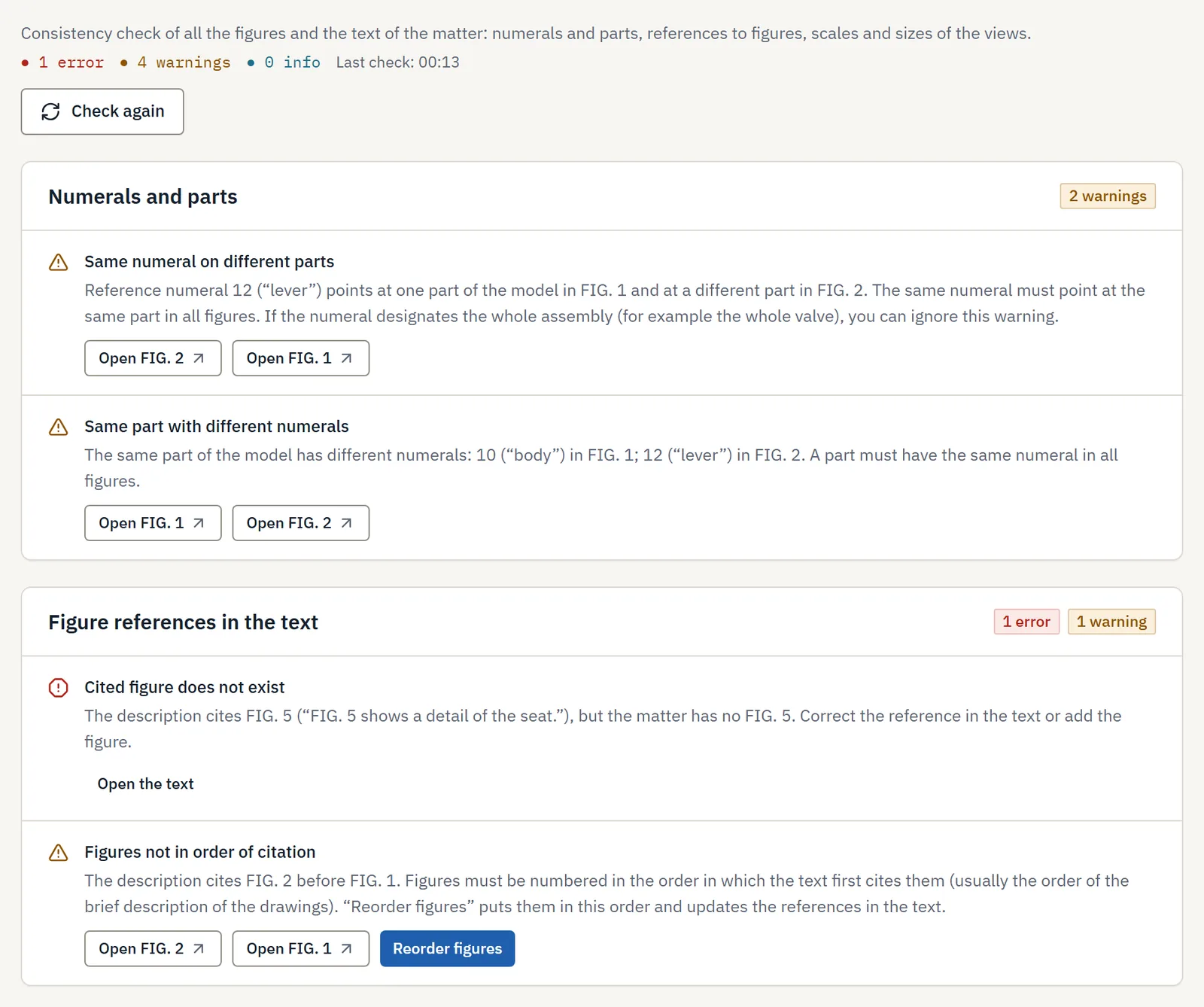
Patent drawing consistency check report: reference numerals and parts, FIG. references in the description, 1 error and 4 warnings
The “Checks” tab on a sample matter: 1 error and 4 warnings, each with a button that opens the figure to fix.

The rule

What do patent offices require for reference numerals?

In a patent application, each reference numeral must always designate the same part and must appear both in the drawings and in the text. This is required by the Decision of the President of the EPO dated 7 July 2025 (OJ EPO 2025, A49) together with the Guidelines for Examination A-IX, 7.5.4, by Rule 11.13 PCT and, for Italian patents, by Art. 22 of Ministerial Decree D.M. 33/2010.

Inklaim checks these correspondences across the whole matter before filing, while a correction still costs little.

OfficeRuleWhat it requires for reference signs
EPOArt. 1(2)(d) and (i) of the Decision of 7 July 2025, OJ EPO 2025, A49; Guidelines A-IX, 7.5.4Simple reference signs, without brackets or circles. A sign that does not appear in the description and claims may not appear in the drawings, and vice versa. Same element, same sign throughout the application.
PCTRule 11.13 PCTSigns consistent with the description; same element, same sign. With many signs, a separate sheet listing them is recommended.
UIBMArt. 22(3), D.M. 33/2010Sheets numbered consecutively; the figure numbers and the numbers or letters of the parts must be referred to in the description.

If you delete a figure, the EPO Guidelines ask you to remove from the text the reference signs that concerned only that figure. It is one of the cases where a numeral left in the description draws an objection.

Updated October 2026

What it checks

Six checks across the whole matter, not figure by figure

You start the check from the matter's “Checks” tab and repeat it with “Check again” after each correction. It compares all the figures and the text of the application with each other.

Same numeral, same part

Finds a numeral used for different parts, and a part that has two different numerals in different figures.

Text and figures aligned

Flags numerals found only in the text or only in the figures, visible parts without a numeral, and numerals that are not in the matter's list of reference numerals.

FIGs. cited and in order

Every “FIG. n” cited exists, every figure is cited, and the figures follow the order of their first citation in the text.

Scale and dimensions between views

Compares the dimensions of the views of the same object with a 3% tolerance. A view that is 10% narrower is flagged.

Office rules

For each figure: usable area, minimum character height, line thickness, labels, sheet numbers and text matter that is not indispensable.

AI visual check

Optional: if your firm has turned AI on, a visual comparison between views proposes further warnings, which you confirm.

The report

How do you read the check report?

Each warning says what does not match, where, and what to do. The “Open” button takes you to the figure with the element to fix already selected.

SeverityWarningExample from the sample matterWhat you do
WarningSame numeral on different partsNumeral 12 (“lever”) designates one part in FIG. 1 and a different part in FIG. 2.Open FIG. 1 or FIG. 2 and correct it. If the numeral designates the whole assembly, for example the entire valve, you ignore the warning.
WarningSame part with different numeralsThe same part of the model has 10 (“body”) in FIG. 1 and 12 (“lever”) in FIG. 2.Choose one numeral and use it in all figures.
ErrorCited figure does not existThe description cites FIG. 5, but the matter has no FIG. 5.Correct the reference in the text or add the figure.
WarningFigures not in order of citationThe description cites FIG. 2 before FIG. 1.“Reorder figures” puts them in order and updates the references in the text.

At the top of the report you see the count of errors, warnings and info items. Warnings are grouped: numerals and parts, figure references, view dimensions.

Compliance per figure

Every figure checked against its office's profile

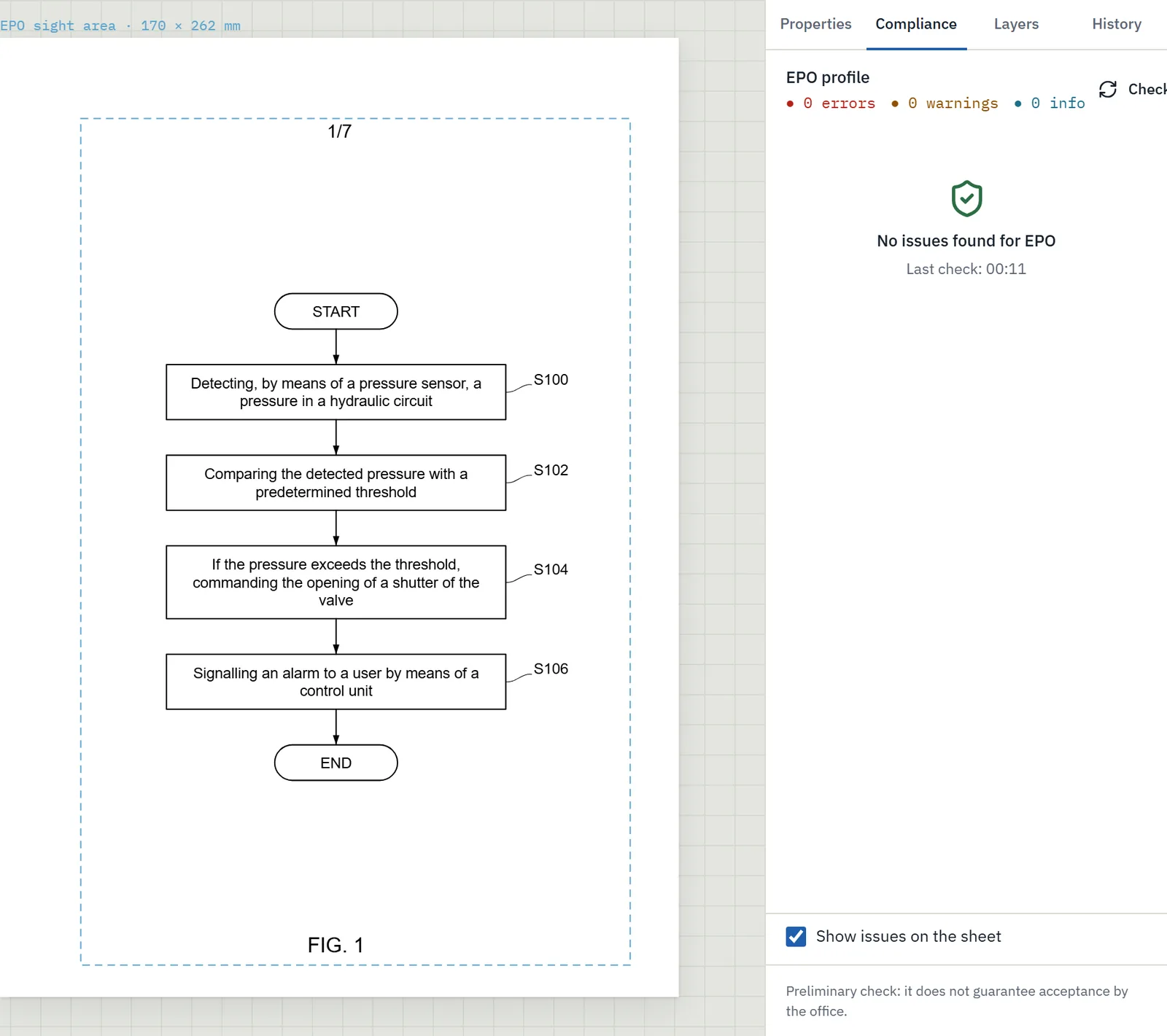
Alongside the consistency of the matter, each figure has its own “Compliance” panel. Choose the EPO, UIBM, USPTO or PCT profile and Inklaim checks that office's formal requirements, with problems highlighted directly on the sheet.

  • Usable area: 17 × 26.2 cm for EPO and PCT; for the UIBM, margins of at least 2.5 cm on all sides (Art. 22 D.M. 33/2010).
  • Numbers and letters at least 0.32 cm high for EPO, PCT and USPTO (Art. 1(2)(g) OJ EPO 2025, A49; 37 CFR 1.84).
  • Line thickness, FIG. labels, sheet numbers such as “1/7”.
  • Text matter that is not indispensable in the figures, with the office's rule next to the warning.

This is a preliminary check: it does not guarantee acceptance by the office. The detailed rules are in the guide to EPO patent drawing requirements.

Compliance check of a patent figure against EPO rules: margins, character height, labels
The “Compliance” panel with the EPO profile on a flowchart: usable area 170 × 262 mm, no issues found.

Before and after

The check you now do by eye, redone after every change

Today, by hand

  • You scroll through the description and the sheets side by side and tick off the numerals one by one.
  • After a change to the figures you check everything again from scratch, or only where you remember making changes.
  • A FIG. that is cited but was removed turns up on proofreading, or in an objection from the office.
  • Scale differences between views of the same part are left to the eye.

With Inklaim

  • One check reads figures, description and claims together.
  • “Check again” redoes every comparison after each correction.
  • Every cited FIG. is looked up in the matter, and every figure in the text.
  • Dimensions between views are compared with a 3% tolerance.

What the check does not do

  • It does not compare dimensions between views that show different sets of parts, for example with and without the housing: it flags them as “not compared”.
  • It does not correct anything by itself: it proposes, and you decide what to change.
  • It does not replace the patent attorney's review, nor does it guarantee acceptance by the office.

Where the numerals come from

Sheets generated from the 3D model use the reference numerals already in the application text or in the matter's list of reference numerals, shared between text and figures. To reassign all numerals in order, use automatic numbering.

Learn more

The check is part of one workflow

Automatic numbering

Move a figure and the “FIG. n” references in the text are updated, with a preview of each change.

Automatic figure numbering →

Sheets from the 3D model

Views, sections and exploded views from STEP or IGES files, at the same scale, with the numerals already used in the text.

Patent drawings from 3D CAD →

The rules on reference signs

What the EPO, PCT, USPTO and UIBM say about reference signs in drawings, with sources.

Guide to reference signs →

FAQ

Questions about the consistency check

Does the check also find numerals that appear only in the text?

Yes. It flags reference numerals found only in the text or only in the figures, visible parts without a numeral, and numerals that are not in the matter's list of reference numerals.

How does it compare the scale between views?

It compares the dimensions of views of the same object with a 3% tolerance. Views that show different sets of parts, for example with and without the housing, are flagged as “not compared”.

Do you need AI for the consistency check?

No. Numerals, figure references and dimensions are checked without AI. The AI visual check between views is optional, works only if your firm has turned AI on, and proposes warnings that you confirm.

Does the check guarantee that the office will accept the drawings?

No. Inklaim prepares drafts checked against the known formal rules of the EPO, UIBM, USPTO and PCT. The final check and the filing remain with your firm.

Does it also work for UIBM, USPTO and PCT?

Yes. Consistency between numerals, figures and text applies to any office. The compliance of each figure is checked against the profile you choose: EPO, UIBM, USPTO or PCT.

What happens when I correct a numeral?

The “Open” button takes you to the figure with the element already selected. After the correction, press “Check again” and the report updates. To reassign all numerals, use “Renumber all”.

The pilot

Try the check on three matters already published

In the 4-week pilot, 3 to 6 people from your firm use Inklaim to redo the sheets of 3 matters already filed and published. Then we compare time and quality together. It starts after a non-disclosure agreement is signed.

English Deutsch Español Français 日本語 한국어 中文