Inklaim Features Texts and translations

Texts in the drawings

Translate patent drawings: all figure texts in one table, with the matter's glossary

Inklaim collects all the text in a matter's figures in a single table. You search and replace across all figures at once, translate with optional AI following the matter's glossary and the existing translation of the claims, and export the sheets per language, including Chinese, Japanese and Korean. The drawing stays one; the numerals never change.

Inklaim is web software from an Italian start-up founded in Turin that prepares draft patent drawings, checked against EPO, UIBM, USPTO, PCT, CNIPA and KIPO rules, from 3D CAD models (STEP/IGES), DXF or vector PDF files, photos of an object, sketches and claims.
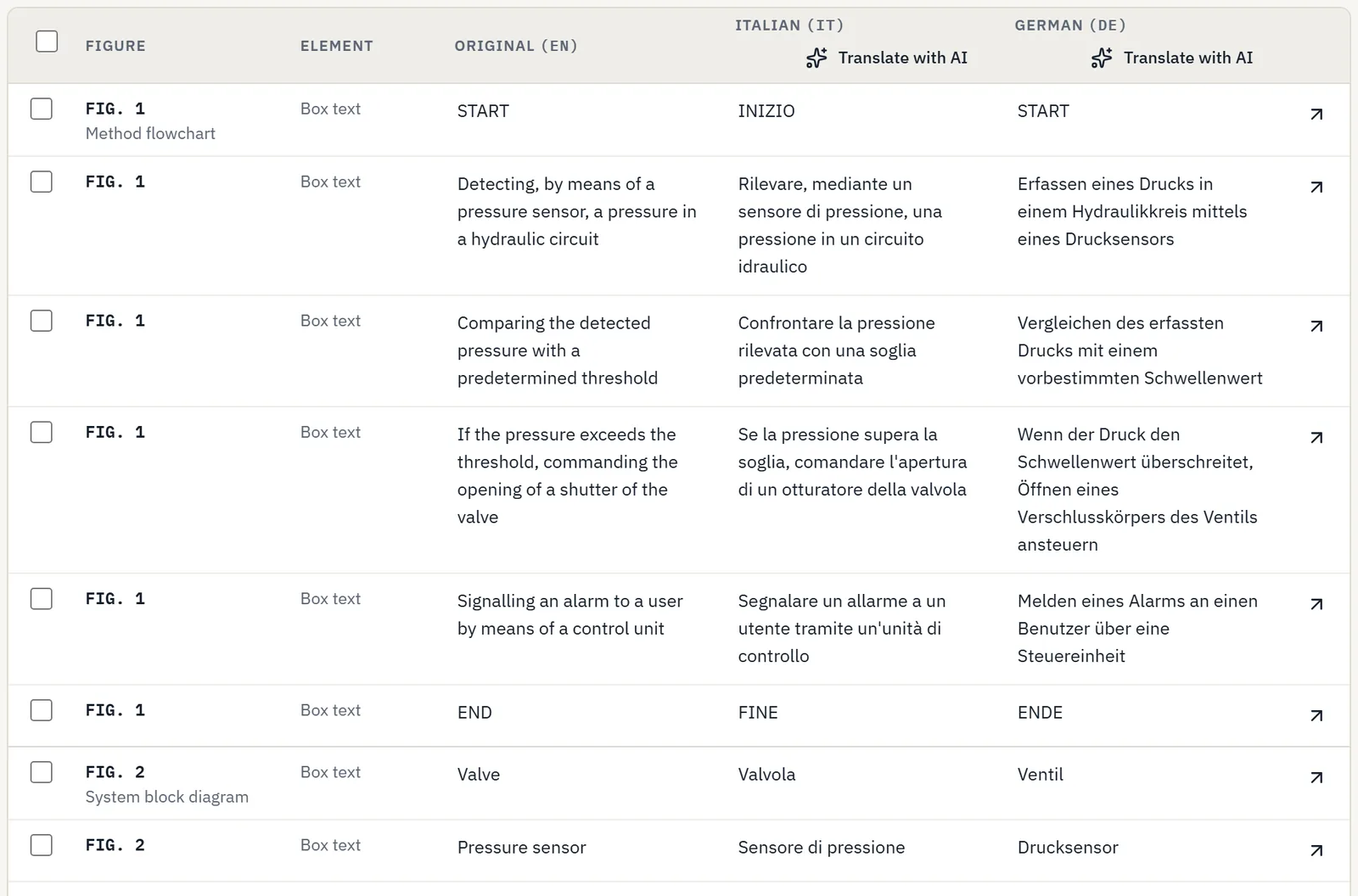
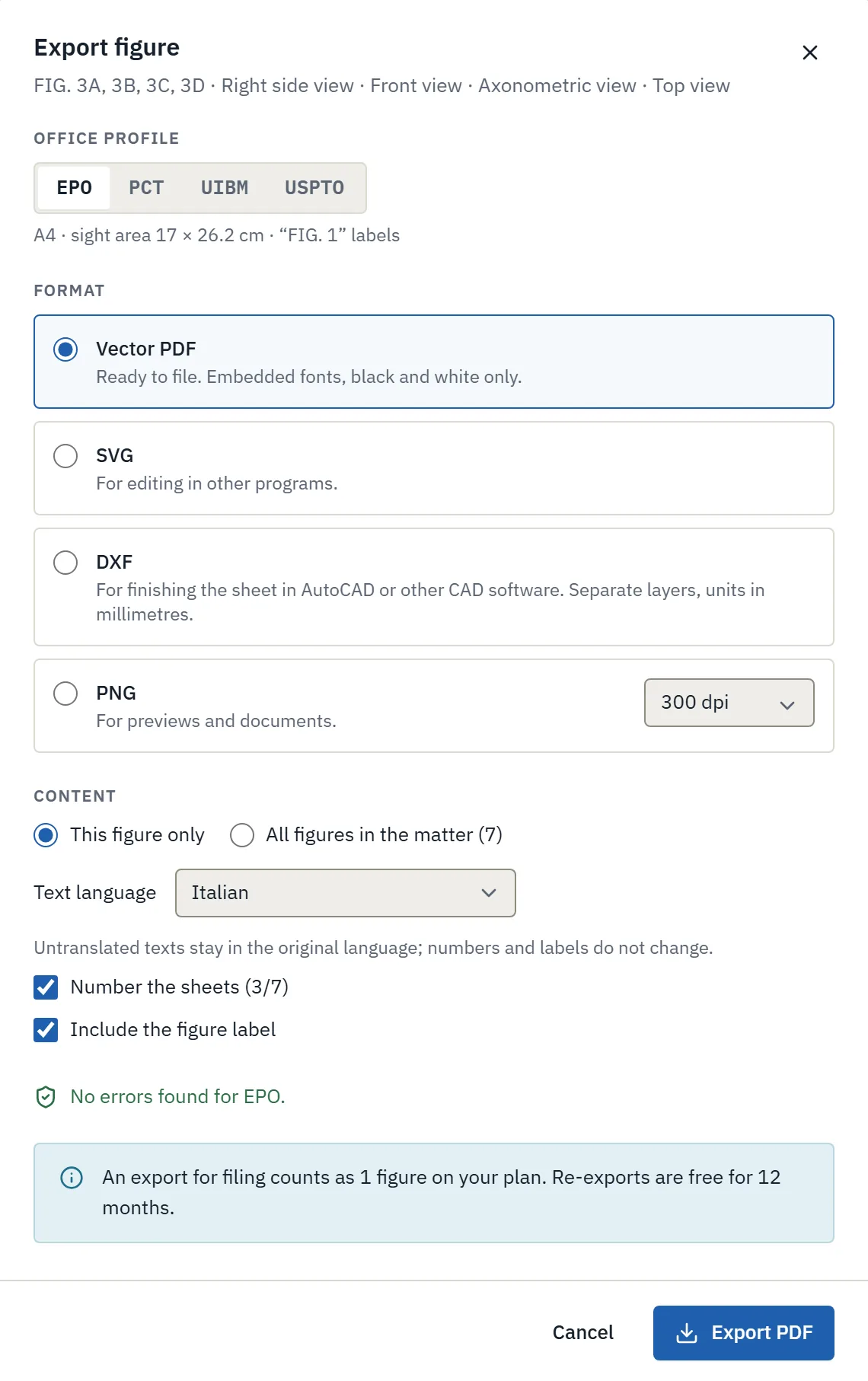
Table of all texts in the patent figures, with the English original and Italian and German translation columns
The text table of a sample matter: for each text, the figure, the English original and the Italian and German columns, each with “Translate with AI”.

The rule

How much text is allowed in patent drawings?

In the drawings of a European patent, text is allowed only as a few indispensable keywords, placed so that a translation can replace them without covering any lines (Art. 1(2)(j) of the Decision of the President of the EPO dated 7 July 2025, OJ EPO 2025, A49; EPO Guidelines A-IX, 8). In flowcharts, a short sentence per step is also allowed.

When the application enters the PCT national phase, the translation also covers the text matter of the drawings (Rule 49.5(a) PCT).

OfficeText allowed in the drawingsSource
EPOA few indispensable keywords, such as “water”, “open”, “section on AB”, with free space around them for the translation. In flow sheets, a short sentence per step.Art. 1(2)(j), OJ EPO 2025, A49; Guidelines A-IX, 8
PCTWords only when indispensable; in block diagrams and flow sheets, a few short words, placed so that the translation can be pasted over them.Rule 11.11 PCT
PCT, national phaseThe translation covers “any text matter of the drawings”; the indication “Fig.” is not translated.Rule 49.5(a) and (f) PCT
USPTOLegends are allowed, with as few words as possible.37 CFR 1.84(o)
UIBMAccording to Chamber of Commerce practice, no wording except what is needed to understand the sheets and, where relevant, the scale.Genoa Chamber of Commerce guide (secondary source, in Italian)

Updated October 2026

The text table

Every text in every figure, in one place

You no longer open the sheets one by one to find a word. For each text, the table lists the figure, the element, the original and one column per language.

Search and replace

Change a word across all figures at once. Before confirming, you see every change, figure by figure.

Text matter that is not indispensable

A warning flags excess text with each office's rule: for the EPO, Art. 1(2)(j) and A-IX, 8; for the PCT, Rule 11.11.

From text to numeral

With one click, you turn a label into a reference numeral, to be explained in the description instead of on the sheet.

Room for the translation

Text boxes adapt when the translation is longer than the original, without moving the lines of the drawing.

Translations to review

If you change an original text, its translations go back to “Needs review” and stay flagged in the table.

One drawing, many languages

The texts change language, never the numerals: the geometry and the reference numerals are the same in every export.

Translation with the glossary

The same word for the same part, in German too

With AI turned on, “Translate with AI” translates a whole column into English, German, French or another language. The translation follows the matter's glossary and the existing translation of the claims, so “valve” stays “Ventil” in every figure and matches the text.

Every translation is a proposal: you review it in the table before exporting.

AI is optional, and data is stored in the EU

  • Each firm turns AI on or off with a switch. With AI off, no content goes to the AI provider.
  • When it is on, it runs on Google Cloud, with processing in the European Union.
  • Monthly request limit per firm, with visible usage.
  • Every text translated with AI is marked in the app and in the metadata of exported files (EU AI Act, Art. 50), with nothing visible on the sheet.

How we handle matter data →

Export per language

Choose the office and the language; the rest follows

On export, you choose the office profile, EPO, UIBM, PCT or USPTO, and the language of the texts. Sheets, margins and labels follow the office's rules; the texts take the chosen language.

  • Export per language, including Chinese, Japanese and Korean.
  • Untranslated texts stay in the original; numerals and labels do not change.
  • Vector PDF ready to file, with embedded fonts and black and white only; SVG; layered DXF in millimeters to finish in AutoCAD; PNG at 300 dpi.
  • One figure or all the figures of the matter, with numbered sheets.

To validate a European patent in Italy, the translation must be filed within 3 months (Art. 56 CPI, Italian Industrial Property Code). Any wording in the drawings is normally translated together with the rest of the file: check each case with your patent attorney.

Exporting a patent drawing sheet for filing: choice of patent office profile and text language
The export window: EPO profile, vector PDF, text language Italian.

Before and after

Translate the figures without redrawing them

Today, by hand

  • You open each sheet in CAD, copy the texts and send them to the translator.
  • You paste the translations back figure by figure and fix the texts that overflow.
  • You keep one copy of the drawing per language, and every change has to be repeated.
  • The term in the figures may not match the one in the translated claims.

With Inklaim

  • All the matter's texts are in one table, with the languages in columns.
  • AI translation follows the glossary and the claims already translated.
  • One drawing, exported in every language with the same numerals.
  • If the original changes, the translations go back to “Needs review”.

Security and data

Where matter data is stored, what AI does and does not do, export and deletion.

Security and data →

EPO requirements

Usable area, 0.32 cm characters, numbering and text in drawings under the Decision of 7 July 2025.

Guide to EPO patent drawing requirements →

Consistency check

Reference numerals consistent across figures, description and claims, in every language.

Patent drawing consistency check →

FAQ

Questions about texts and translations in drawings

What text is allowed in the drawings of a European patent?

Only a few indispensable keywords, such as “water”, “open” or “section on AB”, with free space around them for the translation (Art. 1(2)(j) OJ EPO 2025, A49; Guidelines A-IX, 8). In flowcharts, a short sentence per step is allowed.

Are the texts in the drawings translated in the PCT national phase?

Yes. Rule 49.5(a) PCT includes the text matter of the drawings in the translation. The indication “Fig.” is not translated (Rule 49.5(f)).

For validation in Italy, are the texts in the figures translated?

Any wording in the drawings is normally translated together with the rest of the file; the translation must be filed within 3 months under Art. 56 CPI. Check each case with your patent attorney.

Do I have to use AI to translate?

No. AI is optional and each firm turns it on or off. With AI off, no content goes to the provider; when it is on, it runs on Google Cloud with processing in the EU, and translations are proposals to review.

What happens if I change the original text after translation?

The translations of that text go back to “Needs review” and stay flagged in the table until you check them.

In which languages can I export the sheets?

AI translation covers English, German, French and other languages; export per language also works in Chinese, Japanese and Korean. The reference numerals do not change.

The pilot

Try the text table on three published matters

In the 4-week pilot, 3 to 6 people from your firm use Inklaim to redo the sheets of 3 matters already filed and published. Then we compare time and quality together. It starts after a non-disclosure agreement is signed.

English Deutsch Español Français 日本語 한국어 中文